Subagents are great until your agents need to coordinate. My frontend agent needed to know what API shapes the backend agent was creating, and I was just manually copy-pasting context between them. Claude Code has an experimental feature called agent teams that handles the coordination for you, shared task lists, peer-to-peer messaging, a team lead that synthesizes everything. Anthropic used the same concept to build a C compiler with 16 parallel agents, which is a wild read if you want to see how far this scales.
HOW THEY’RE DIFFERENT FROM SUBAGENTS
Why would you want agents that talk to each other if it costs more tokens?
Subagents are like sending two people off to research different things separately. They each come back with a report, and you put it together. They never interact with each other.
Agent teams have a team lead that breaks down the work, a shared task list everyone can see, and agents that can message each other and wait on dependencies. The lead tracks what’s done, shuts agents down as they finish, and synthesizes everything at the end, less like delegating errands and more like running a standup.
STILL EXPERIMENTAL As of early 2026, agent teams require an experimental flag in your Claude Code settings. The feature could change with updates. I’ve been using it for real builds and it’s been solid, but fair warning.
SETTING IT UP
Add this environment variable in your Claude Code settings:
CLAUDE_CODE_EXPERIMENTAL_AGENT_TEAMS: "1"Restart Claude Code and you’re done. No special syntax to learn. Just describe the work and Claude figures out how to split it into a team, or be specific about what agents you want. You can press ctrl+t anytime to see the shared task list.
WHAT THIS ACTUALLY LOOKS LIKE
I used teams for a feature build that needed database changes, multiple API endpoints, and a frontend rewrite. I ran it as two separate team phases.
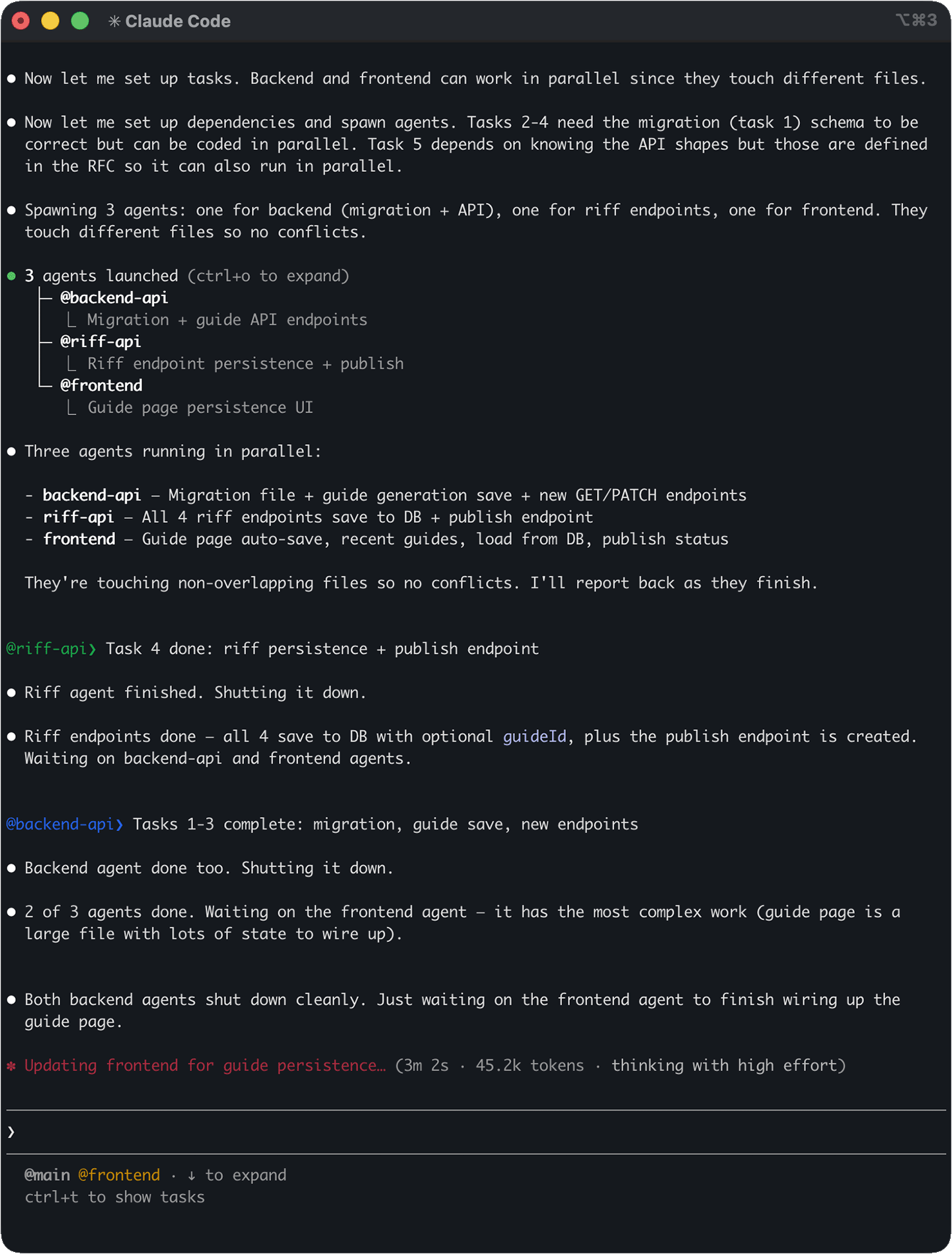
- Phase 1 was an audit team. Two research agents running in parallel, one reading through the guide flow and UI state, the other auditing the database schema and existing RFCs. They reported back and the team lead synthesized everything into a clear summary: data shapes per platform, what was missing from the RFC, what we could skip. All of that fed into the build.
- Phase 2 was a build team with three agents. @backend-api handled the migration file and guide endpoints, @riff-api built all four riff persistence endpoints plus a publish endpoint, and @frontend wired up the guide page with auto-save and persistence UI. They were touching non-overlapping files so no conflicts, and the team lead tracked progress as each one finished. The riff agent wrapped up first, then backend, and the frontend agent kept going since it had the most complex work.
By default all agents run in your terminal and you cycle between them with Shift+Down. If you’re using iTerm2 or tmux, each agent gets its own pane and you can watch them all work at the same time.
SPLIT PANES The side-by-side agent view only works in iTerm2 or tmux. VS Code’s terminal doesn’t support it. In a basic terminal you’ll cycle through agents one at a time instead.
TEAMS VS SUBAGENTS VS MULTI-CLAUDING
Agent teams are for when the work needs coordination: frontend + backend + tests, parallel audits feeding a single plan, anything where agents benefit from knowing what the others are doing.
Subagents for independent tasks that report back: research, codebase exploration, content generation. Cheaper since team agents each have their own context window.
Multi-clauding for completely separate work across different projects or tasks. No coordination, just parallel sessions you manage yourself.
COST AND GOTCHAS
Each teammate gets its own context window, so a three-agent team uses roughly 3-4x the tokens of a single session. You’ll burn through rate limits faster than usual.
The move that saves the most tokens: audit first, then build. My research team cost a fraction of what it would have if the build team tried to figure things out while coding. Getting the plan right before spawning builders means fewer wrong turns.
A few other things to know going in: there’s no session resumption for teams, so closing the terminal loses the team state. Teammates sometimes forget to mark tasks complete, which confuses the lead. You can only run one team per session. And if you give agents overlapping files, they’ll overwrite each other. The full limitations list in the docs is worth skimming before you start.
WHEN IT’S OVERKILL
If the work is sequential, or it’s a simple lookup a subagent could handle, or Claude doesn’t have enough context to know how to split things up, you don’t need a team. Honestly, most tasks don’t need a full team. Start with subagents and only reach for teams when you’re actually feeling the coordination pain.