I run a few vibe projects at the same time and I work on whichever one I feel like on any given day. Every time I open Claude Code on a project I haven’t touched in a while, I have no idea where I left off - which features are done, which are half-built, what I tried last time that didn’t work. I’d been using RFCs to track all of this, but I kept forgetting to read them at the start of a session and update them when I wrapped up. So I built a Claude skill that handles the reading and updating for me.
WHAT IT DOES
When I open a session and say “where were we” or “what’s next” or even just mention a feature by name, the skill reads every RFC in the project and shows me a status table:
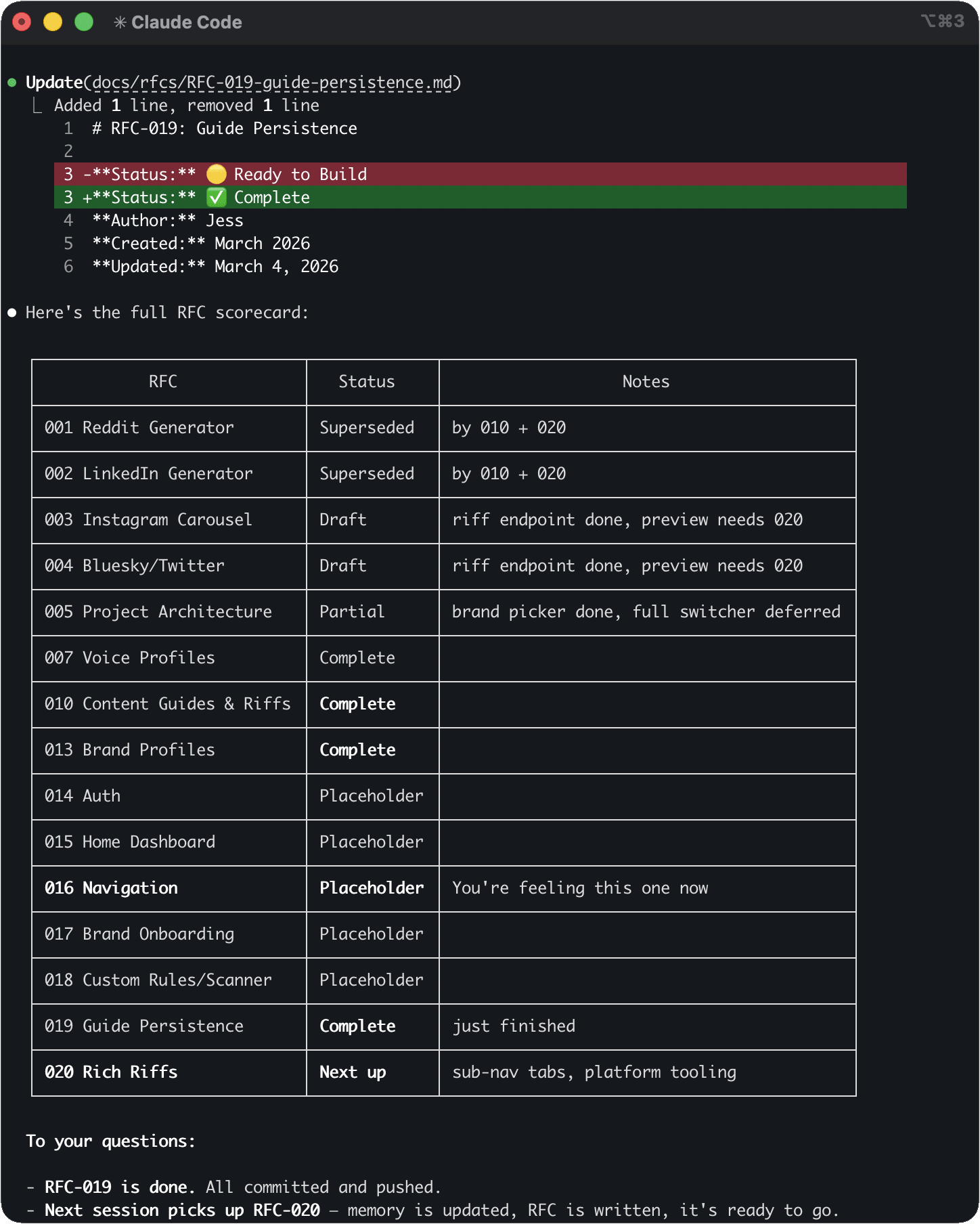
That’s from a project with 15+ features being tracked. I can scan the whole thing in seconds, say “let’s pick up 020”, and Claude already has the context loaded - what’s done, what’s in progress, what was tried and failed.
When I’m done for the day, the skill asks what got done and what didn’t work, then updates the RFC. The “what didn’t work” part is the most valuable piece. Without it, the next session might spend 20 minutes going down a path I already ruled out.
WHAT’S IN THE SKILL
This is a simplified version of my skill. If you want to try it, copy the skill below and paste it into Claude Code asking it to turn it into a user-level skill. It’ll create the file and folder for you.
USER VS PROJECT SKILLS Claude Code skills can live in two places. A user-level skill follows you everywhere - no matter which project you open, it’s there. A project-level skill only shows up when you’re working in that specific project. My RFC manager is user-level because I want it available in every project I open, not just one.
---
description: "Use when user mentions rfc, feature, continue, pick up,
where were we, progress, status, what's next, or asks about decisions
and what's been tried."
---

# RFC Manager

Tracks complex multi-session work using RFCs in docs/rfcs/.

## When to Engage

- User mentions "rfc" → always engage
- User asks about progress/state → check if RFCs exist first
- User describes complex work → suggest an RFC
- Simple tasks, quick fixes, writing → stay quiet

## On Session Start

Read all RFC files in docs/rfcs/. Present a status table:

| RFC | State | Last Touch |
|-----|-------|------------|
| feature-name | 🟡 Active | Mar 4 |
| other-feature | ✅ Done | Mar 1 |
| old-thing | 💤 Parked | — |

State icons: 🟡 Active, 📝 Draft, 💤 Parked, ✅ Done

Ask which to pick up or if starting something new.

## On Session End

When wrapping up RFC-tracked work:
1. Ask what got done
2. Ask what didn't work (IMPORTANT - prevents retrying)
3. Show proposed RFC updates before writing them
4. Update the RFC: progress tracker, session summary, next action

## Creating New RFCs

When work looks like it'll span multiple sessions, offer to
create an RFC with: Mission, Progress Tracker, Last Session
Summary (including What Didn't Work), Architecture Decisions
table, Known Issues, and a Session Log.

## Key Rules

- Always read the RFC before starting work
- Track what DIDN'T work (this is the whole point)
- Architecture Decisions table is append-only (no re-debating)
- Set Next Action at the top before closing out
Tweak the trigger words in the description to match how you talk. I added “what have we tried” and “what didn’t work” to mine because the skill wasn’t catching those at first.
WHY A SKILL AND NOT SOMETHING ELSE
LLMs are stateless - Claude doesn’t remember anything between sessions. There are ways to deal with this at various levels of complexity:
- Built-in options. Claude Code has
--resumeand--continuefor picking up recent sessions, and it writes auto-memory in the background. Useful, but passive - they track what Claude observed, not implementation state like “step 3 is half-done and we tried Zustand but it didn’t fit.” - Hooks-based tools. Projects like claude-code-handoff and claude-code-context-handoff auto-save and restore session context using hooks. More automatic, but you need to configure the hooks yourself.
- MCP servers and frameworks. Session Continuity MCP, Context Mode (SQLite-backed), and Continuous Claude are powerful but developer-oriented and require real setup.
The RFC manager skill is just markdown files and a skill description. No databases, no MCP config, no hooks. If you already use RFCs for tracking features, the skill just makes sure they get read and updated every session.